Well Investment Proposal
App · Finance & Accounting
Well Investment Proposal is a drilling authorization for expenditure (AFE) and capex approval app for oil and gas asset teams, built on Joget DX 9.1.1, that captures well proposal details, calculates financial metrics, and routes proposals through a capex approval workflow. Oil and gas asset teams currently manage well proposals and AFEs using spreadsheets and email. Proposals often sit unnoticed in an inbox. It is difficult for Asset Managers to see which cost estimate is current, who holds the proposal, and how one well ranks against others when competing for the drilling budget. Key Features Well Investment Proposal totals drilling, completion, facilities, and contingency cost lines on the New Proposal. Well Investment Proposal calculates NPV, profitability index and average payback from the yearly cash flow table on the proposal. Well Investment Proposal sends each proposal to the Asset Manager and then Engineering, who approve, reject or return it from My Tasks, and emails the requester at each outcome. Well Investment Proposal ranks every proposal by profitability index on Portfolio Ranking. Well Investment Proposal drafts an AI review with a Strong, Marginal or Weak verdict, the investment case, risks and gaps, and questions for the author, while the Asset Manager decides. Frequently Asked Questions What is an AFE in oil and gas, and where does Well Investment Proposal fit? An AFE (authorization for expenditure) is the document an operator uses to estimate drilling costs and secure approval before spending money. Well Investment Proposal covers the internal half: the cost estimate, the economics, and the approval chain. How does Well Investment Proposal calculate NPV, payback and profitability index without code? Well Investment Proposal uses Joget's standard Calculation Field and Spreadsheet elements. The formulas for NPV, average payback, and profitability index are configured directly within the app, avoiding the need for custom scripts or plugins. Does Well Investment Proposal handle partner AFE balloting or actual-versus-AFE cost tracking? No. Well Investment Proposal focuses on the proposal creation and approval process. It does not include functionality for partner (non-operator) AFE balloting or tracking actual costs against the original AFE. Does Well Investment Proposal need a live oil price feed? No. The user picks a Price Deck record on the proposal. There is no need for a live price feed or an API key for accessing price information. Which Joget version does Well Investment Proposal run on, and what does the AI need? Well Investment Proposal is built on Joget DX 9.1.1. The AI functionality requires your own AI configuration and key. The reviewer steps are mapped to your own users or groups.
Northstar Treasury App
App · Finance & Accounting
Northstar Treasury is a cash position and weekly cash flow forecast application on Joget DX 9.1.1 Enterprise for finance and treasury leads at small and mid-size companies who track several bank accounts on spreadsheets. Northstar Treasury is built with Joget's form, list and userview builders. No code. Finance managers in logistics, trading and distribution companies keep the daily cash position in a spreadsheet that one person updates. Bank movements sit on one tab and the weekly cash flow forecast in a second file that never agrees with the bank account register. When a director asks how much cash the company holds today, the answer has to be rebuilt from both. Key Features Registers each bank account with its bank, account reference, currency, account type, opening balance and an Active or Archived status. Records every transaction with date, account, direction, amount, counterparty and a Draft or Confirmed status. Draft rows stay out of the cash position. Calculates the cash position for one selected currency as Active opening balances plus Confirmed inflows less Confirmed outflows, each time the Dashboard opens. Shows cash flow by week and the current balance of each Active account under Liquidity by account. Filters transactions by Direction and Status, and totals Confirmed inflow, outflow and net movement. Projects the balance week by week from planned movements, each marked Contracted, Expected or Indicative by the person who entered it. Frequently Asked Questions Does Northstar Treasury convert currencies or show one consolidated total? No. Northstar Treasury holds no exchange rates and never adds one currency to another. The Dashboard, Forecast and Transactions totals show one currency at a time. Does Northstar Treasury connect to a bank or predict cash flow? No. Northstar Treasury has no bank feed and no forecasting model. Finance staff type every record into Joget forms, and the Forecast page adds the planned movements to the Confirmed position. No confidence percentage is calculated. Which Joget DX version does Northstar Treasury need? Northstar Treasury was verified on Joget DX 9.1.1 Enterprise with the EChart Menu and Column Template Formatter plugins installed. Request a walkthrough at https://joget.com/contact-us/ or write to sales@joget.org. A Joget administrator can change a field, a filter or a page in the builders, with no code, once the app is imported.
Invoice Flow App
App · Finance & Accounting
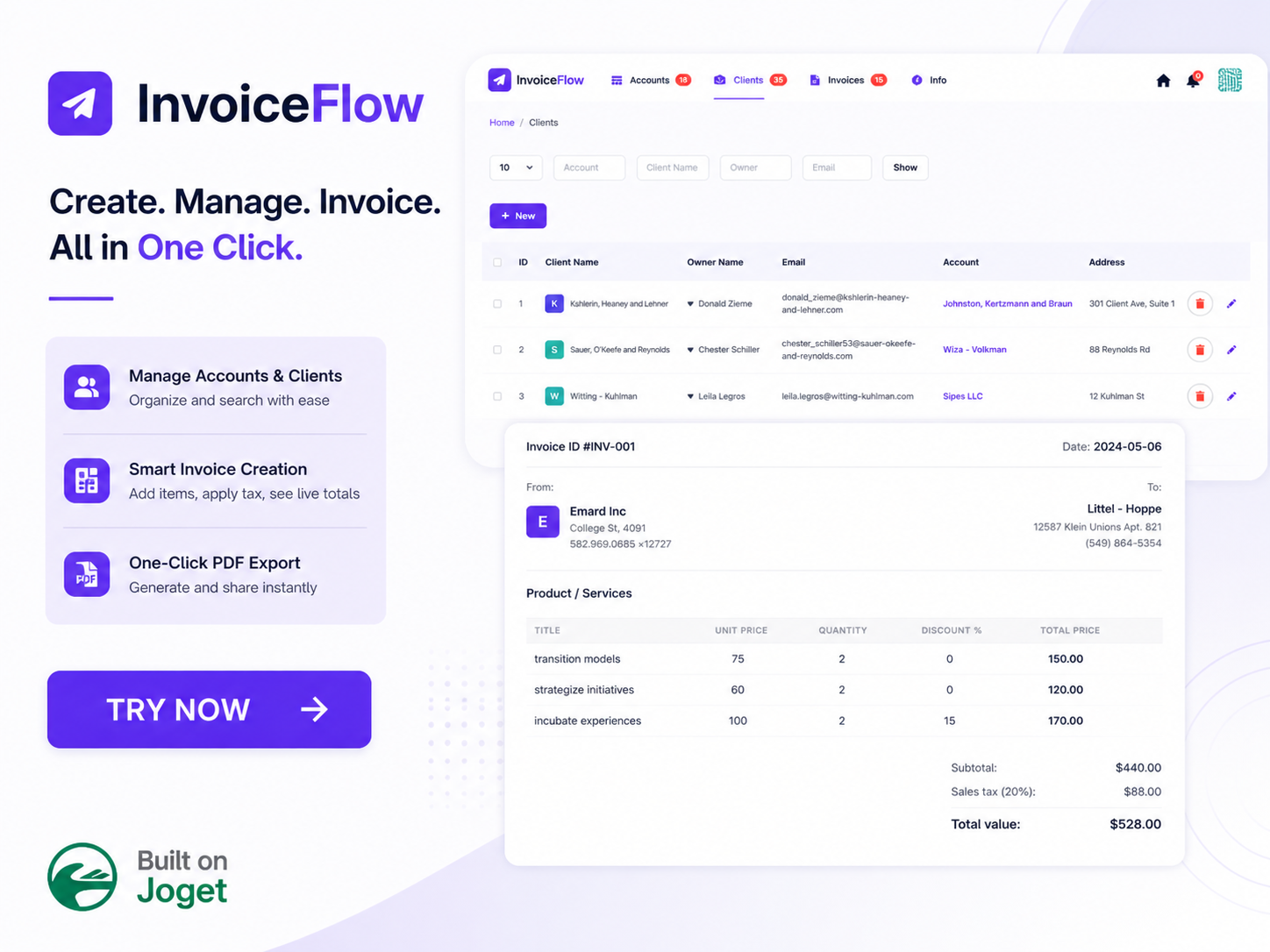
Invoice Flow App is a client billing and account management application that centralizes account records, client profiles, and itemized invoice calculations on Joget DX 8 and Joget DX 9. Finance teams and account managers manually calculate line items, discounts, and sales tax in spreadsheets before copying data into invoice documents. Manual calculations lead to incorrect total values, lost client contact details, and mismatched billing records across accounts. Disconnected invoicing processes make tracking account ownership and historical client billing history difficult for operations teams. Key Features Tracks company account profiles with uploaded corporate logos, owner contact emails, addresses, and phone numbers. Maintains searchable client directories linked directly to parent company account records. Calculates line-item total prices, subtotals, sales tax percentages, and final invoice values dynamically within the billing form interface. Displays itemized invoice preview screens with product descriptions, unit prices, quantities, and discount percentages. Exports completed billing records into formatted A4 PDF documents using a one-click export action. Provides an integrated information page accessible from the main navigation bar to guide users through application features and setup steps. Frequently Asked Questions How does Invoice Flow App calculate line items and final invoice totals? Invoice Flow App multiplies unit prices by quantities, applies line-item discount percentages, calculates the subtotal, and adds the specified sales tax percentage to generate the total invoice value automatically. Can users download PDF versions of invoices from Invoice Flow App? Invoice Flow App includes a dedicated export action button on the invoice view screen that generates and downloads an A4 formatted PDF document containing complete account and itemized billing data. Which Joget DX platform versions support Invoice Flow App? Invoice Flow App runs on Joget DX 8 and DX 9, On-Premise as well as Cloud environments across Enterprise editions. Important Note: Please refer to the info page in the app to learn how to use the app.
Training Evaluation
App · Education
Training Evaluation is a classroom course feedback collection and training effectiveness analytics application that manages event registries, captures trainee evaluation ratings, stores signed attendance records, and visualizes participant feedback metrics on Joget DX 8 and Joget DX 9. Human resource managers, learning and development (L&D) directors, and corporate trainers struggle to measure course impact when distributing paper feedback forms or disconnected online surveys. Manual evaluation tracking leads to delayed feedback aggregation, unorganized participant records, unverified trainer performance scores, and missing visual analytics across recurring workshop sessions. L&D leaders lack centralized reporting portals to link trainee ratings to specific event rosters or inspect individual feedback categories across ten dedicated graphical charts. Key Features Establishes master training event registries capturing event names, trainer names, start dates, end dates, target trainee counts, event descriptions, and attached signed attendance sheets. Tracks participant rosters within event records detailing trainee names, email addresses, and contact numbers. Captures online trainee evaluation questionnaires evaluating domain knowledge, course usefulness, expectation fulfillment, product competence, trainer preparedness, content organization, confidence gain, time allocation, and venue suitability. Applies a standardized 1-to-5 Likert rating scale across objective feedback questions to measure participant agreement and satisfaction. Collects subjective open-text comments to gather qualitative trainee suggestions and course improvement feedback. Dispatches automated email notifications to administrative users upon new feedback form submissions via configured SMTP settings. Displays ten dedicated feedback chart channels covering Product Knowledge, Usefulness, Expectation, Use More Competently, Trainers Knowledge, Training Contents, Confidence, Time Allocated, Conducive Venue, and Accessible Venue. Allows administrators to edit existing feedback questions or construct custom evaluation fields using the Joget Form Builder. Renders event management lists with direct action buttons to submit trainee feedback and edit event parameters. Exports training event registries, questionnaire responses, and evaluation summaries into CSV, Excel, XML, and PDF formats. Frequently Asked Questions How does Training Evaluation capture and measure trainee feedback? Training Evaluation presents trainees with structured online questionnaires rating core course dimensions on a 1-to-5 agreement scale, linking responses directly to specific training event records. What specific feedback chart categories does Training Evaluation visualize? Training Evaluation renders ten distinct graphical chart views covering Product Knowledge, Usefulness, Expectation, Use More Competently, Trainers Knowledge, Training Contents, Confidence, Time Allocated, Conducive Venue, and Accessible Venue. Which Joget platform versions support Training Evaluation? Training Evaluation runs on Joget DX 8 and Joget DX 9, On-Premise and Cloud environments across Enterprise editions. What's New Jan-9-2018 - Updated app's SQL statements to be compatible with Microsoft SQL Server. 27-Mar-2026 - Revamped for Joget DX8. Follow the five steps below to start using the system Set up your organization's email SMTP (Note: Admin users will be notified via email on any new feedback submissions). Create a new Training Event. Submit training feedbacks using the "Submit Feedback" link for the respective event. View the evaluation results and via graphical charts Zoom in to see a particular training event's feedbacks using the "Detail Feedbacks" link. This is an example of a sub-level userview menu feature of Joget Workflow.

 App
 Free
 By Joget, Inc.
 420 downloads